
Everything SmartyBuild does.
One system for the whole company — from the first phone call to the commission paid at the end. Every screen below has a short video in the video library.
Stop running the company out of disconnected tools.
Most contractors juggle a CRM, an e-signature app, a phone system, a spreadsheet for sub payments and a week of month-end catch-up. In SmartyBuild a change in one place is felt everywhere it should be: a payment that clears the bank moves the job’s balance, which decides whether the job can close, which decides the commission.
Lead spreadsheetSeparate CRME-signature appOffice phone systemSub-payment spreadsheetJob-profit spreadsheetCommission calculator
What a day on SmartyBuild looks like.
Real screens, recorded on a demo company. Every one has a short video in the video library.
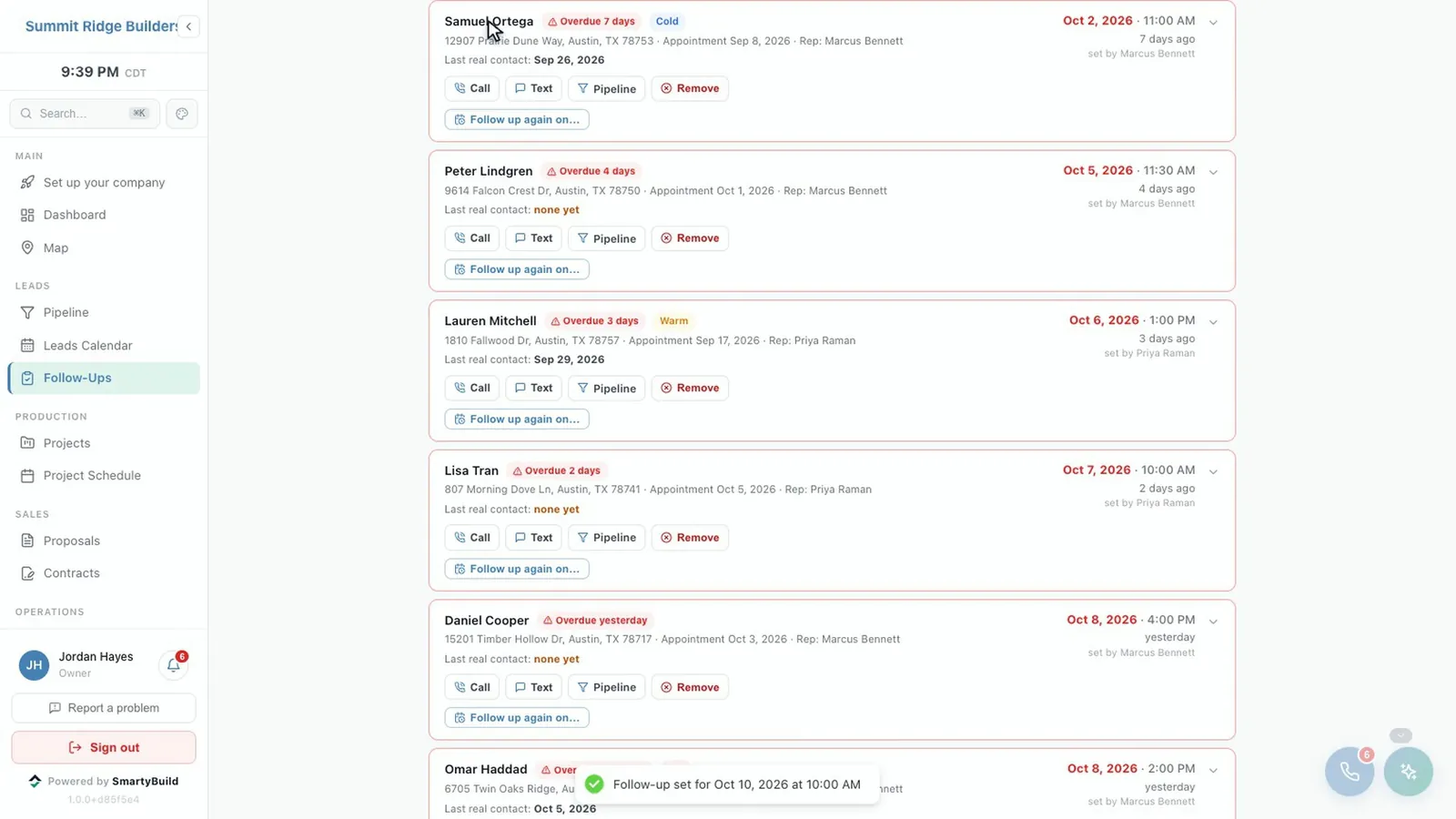
Leads that do not go cold.
Website and phone leads land in one pipeline, duplicates are caught, and follow-ups are tracked rather than remembered.
- Every lead from your website forms and your phone in one place
- Overdue follow-ups flagged, with managers alerted when one slips
- A missed call texts the caller back before they ring your competitor
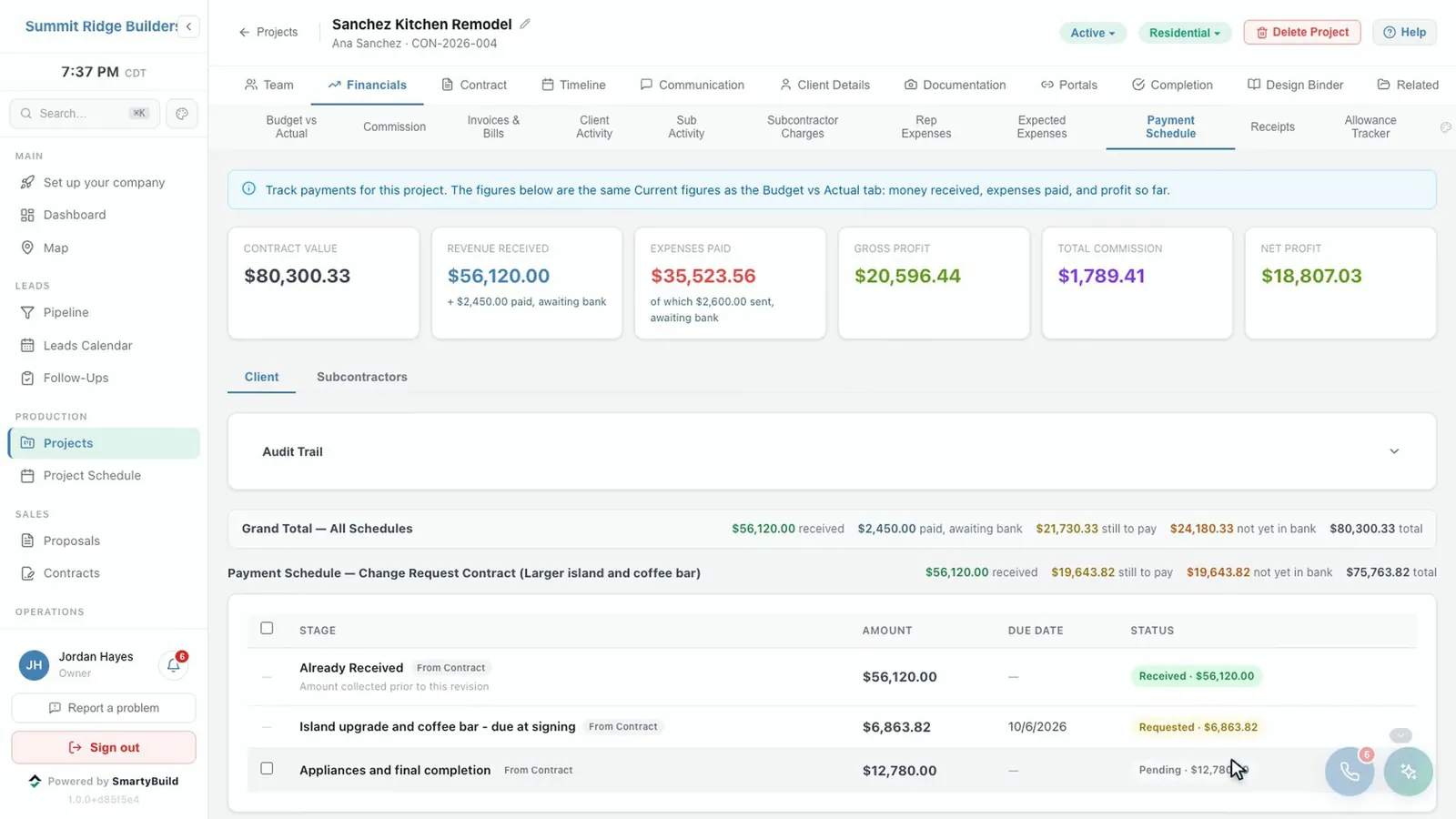
Know what every job has really collected.
Recording a payment says the client paid. Only a matched bank transaction says the money arrived, and only that moves the number. So the profit you see is profit you have.
- Payment schedules, invoices, card and bank payments
- A live bank feed, with deposits split across the jobs they paid for
- Change orders restate the contract; additional work adds to it
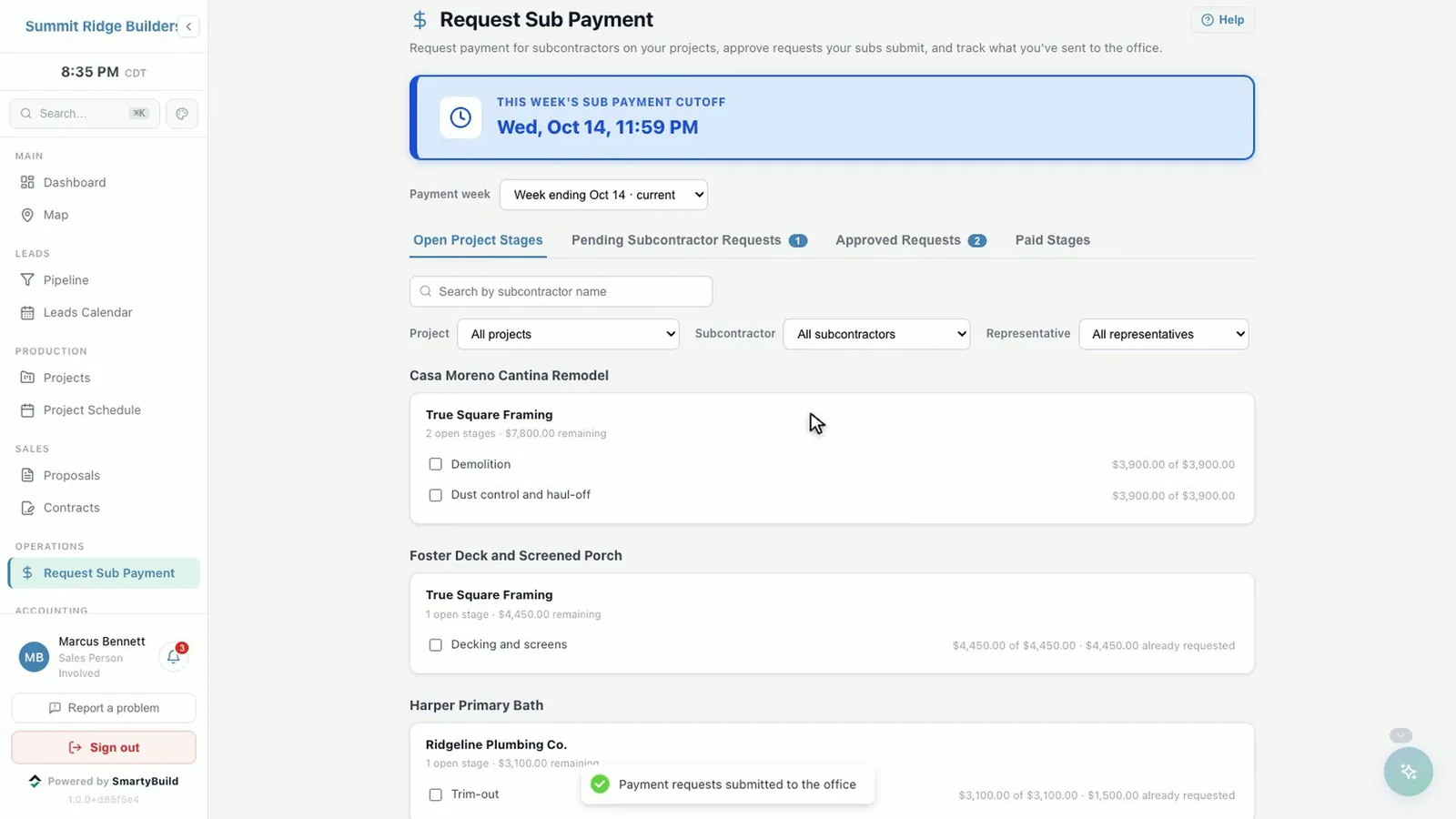
Pay subs in minutes, not a day a week.
Subcontractors get their own front door: their contracts, their scope and a portal where they request payment against the stages you agreed.
- Weekly approval runs with a clear cutoff, aware of bank holidays
- W-9 collection and IRS TIN verification
- Unlimited subcontractors, free on every plan
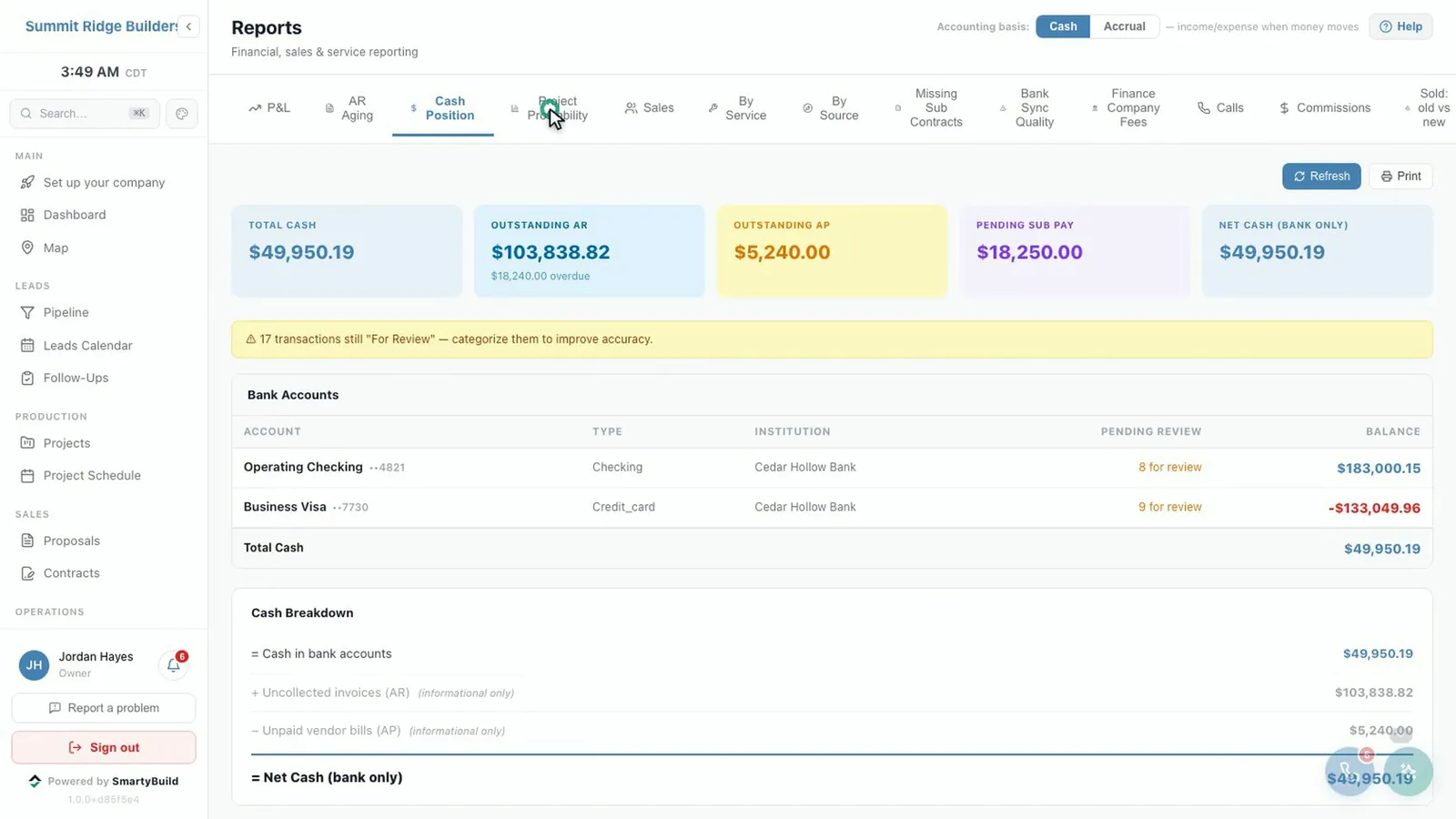
Books that tie to the bank, without the month-end scramble.
P&L, cash position, AR aging, profit per job and marketing return by lead source — built from what actually cleared, not what somebody typed in.
- Card-processing fees tied to the bank to the cent
- Marketing spend and return down to the job, after commission
- Commissions calculated only when a job is genuinely finished
Built for the whole company, not just the sales team.
Proposals and contracts that hold up
Line-item scope and pricing, signed on screen with a record of exactly what the client was shown. Paragraph-level tracking of every edit to your terms.
Your own paperwork, not ours
Upload a PDF you already use and it becomes a live template — the system proposes what each blank is for and fills it from the job.
The job, day by day
Schedule with real finish-to-start dependencies, photos and documents against the job, and a client portal that keeps your client in the loop.
The phone is part of the CRM
A dialer in the browser, call recording, transcripts and texting, with every conversation saved on the client.
AI where it earns its place
Two-sentence call summaries from the transcript, drafting help on scope, and an assistant that answers questions about your own figures.
It tells you what needs you
A deterministic engine decides which jobs need attention and why. Automations watch the activity log and act on what you told them to care about.
Roles you define, not roles we chose
Permissions per module and action, branch-scoped admins, an append-only activity log, and approvals for anything you want a second pair of eyes on.
Showroom and design binders
For companies with a showroom: selections, design binders the client signs, and the billing that follows them into the job.
It notices when it breaks
A signed PDF that failed to render is rebuilt. A call recording the phone company never delivered is fetched back. A payment taken while the browser crashed is found and applied.
The part we care most about
Money software is easy to write and hard to write correctly. Most systems collapse distinctions that look like the same thing and are not — and collapsing them is how a company ends up paying a commission on revenue it never received.
Paid is not Received
✕Somebody types in a payment and the job counts as collected.
✓Recording a payment says the client paid. Only a matched bank transaction says the money arrived — and only that moves the number.
Payment Sent is not Cleared
✕A subcontractor payment that has left counts as settled.
✓Money that has left is not money the bank has confirmed, and it is never enough on its own to close a job.
Completion is earned, not selected
✕Somebody picks “Complete” from a dropdown.
✓A zero client balance, every subcontractor settled, a completion form the client signed, and an approval. Then commissions are calculated.
History is never rewritten
✕Reopening a finished job edits the past, and last month’s report quietly changes.
✓A reopened job posts an adjustment. What you reported in March still says in December what it said in March.
The same care goes into the smaller things nobody advertises: the day’s real card-processing charge is prorated across the jobs that generated it, so your fees tie to the bank to the cent; a change order restates the contract value while additional work adds to it, because they are different documents meaning different things.
Written by a contractor, for a contractor.
SmartyBuild runs a construction and remodeling company across two branches, every day, on real contracts and real money. It was not built to be sold and then tried out on somebody else’s business — it was built because a contractor needed it.
That is why the rules above are so specific. Every one of them is there because getting it wrong cost somebody something.
Your data is never in a shared table.
Each company gets its own copy of SmartyBuild with its own database. Your contracts, margins and commission figures do not sit next to another contractor’s, and nothing somebody else does can slow you down or expose you.
Common questions.
Which payment processor and phone system does it use?
Your own. Card and bank payments run through your own Helcim merchant account and settle straight to your bank, never through us. Calls and texts run through your own Twilio account. The live bank feed, AI features, hosting and backups are included in the price.
Does it work on a phone?
Yes. SmartyBuild runs in the browser on a computer, tablet or phone, so there is nothing to install.
Is it only for residential remodelers?
No. It runs residential and commercial jobs, for companies with one location or several branches.
Does it connect to QuickBooks?
Not today. SmartyBuild keeps its own books from your live bank feed, with a P&L, cash position, AR aging and profit per job, so many companies find they no longer need a separate accounting tool for day-to-day numbers.
See it running your business.
Thirty minutes, with your own jobs in mind. If it is not a fit, we will tell you.